The #1 Trust Wallet simulator
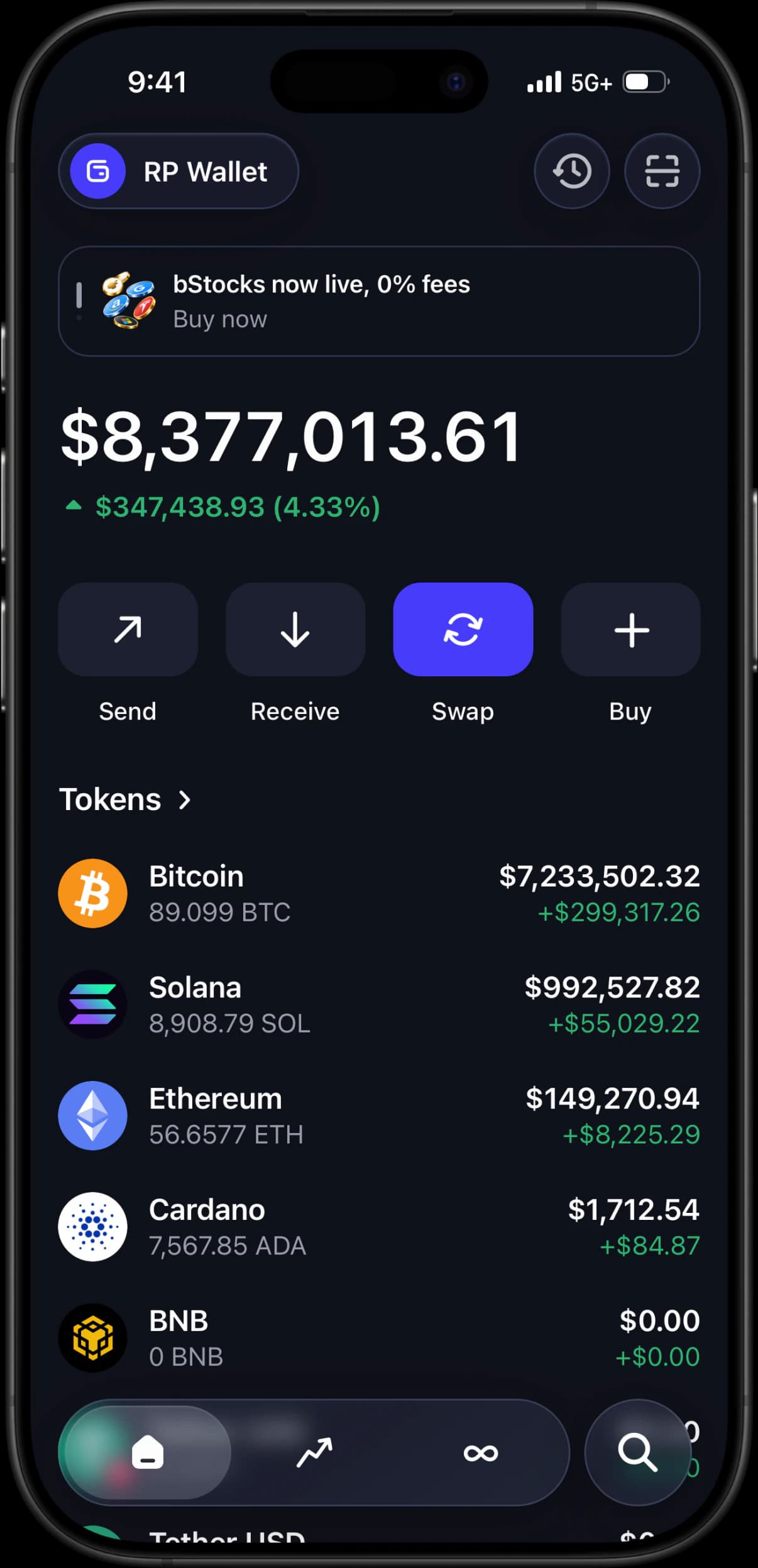
A pixel-perfect Trust Wallet replica for iOS and Android. Set balances across Bitcoin, Ethereum, BNB, Solana and more, import any token, and simulate transactions to create authentic wallet content, demos, and roleplay scenes — with no real crypto, no seed phrase, and no download.
Installing on iPhone?
Compare the Trust Wallet IPA route with RPWallet’s Safari installation and get your simulator onto the Home Screen.
Trust Wallet IPA alternativeEverything a Trust Wallet simulator should do
A full multi-chain wallet experience, engineered for content and demos.
Every chain in one wallet
Bitcoin, Ethereum, Solana, BNB Smart Chain, Tron, XRP, Litecoin, Dogecoin and Sui sit side by side, each with its own balance and chain badge.
Set any balance
Edit any coin to any number in seconds. Build a portfolio that spans chains the way a real multi-chain wallet does.
Import any token
Add stablecoins like USDT and USDC, or any token on Base and Arbitrum, with its logo, ticker, and live-style pricing.
Send, receive, swap and buy
The full action row works, so a walkthrough can move between flows instead of holding on the home screen.
No seed phrase, no risk
Nothing connects to a real wallet or blockchain. There is no private key to leak and no funds to lose.
Works on iOS & Android
Runs as a mobile web app that can be added to the home screen without an App Store or APK download. Eligible Android plans may also use an official signed APK.
How it works.
Step 01
Open RPWallet on your phone
Launch the Trust Wallet simulator in your mobile browser and add it to your home screen for a native feel.
Step 02
Build your multi-chain portfolio
Set balances across Bitcoin, Ethereum, BNB, Solana and the rest, then import the tokens you want on top.
Step 03
Simulate and capture
Trigger sends, receives, and notifications, then screenshot or screen-record the result for your content.
Trust Wallet simulator FAQ.
What is a Trust Wallet simulator?
A Trust Wallet simulator is a pixel-perfect copy of the Trust Wallet interface that lets you set any balance, add any token, and simulate transactions without touching real crypto. RPWallet renders the same multi-chain home screen, markets, swap and send flows, so your screenshots and videos look authentic while nothing connects to a real blockchain, seed phrase, or private key.
Which chains and coins can I show?
The simulator covers the assets a real multi-chain wallet holds: Bitcoin, Ethereum, Solana, BNB Smart Chain, Tron, XRP, Litecoin, Dogecoin and Sui, plus stablecoins like USDT and USDC and tokens on Base and Arbitrum. You can set each balance independently, so a portfolio can be spread across chains exactly the way a real one would be.
Does it work on iPhone and Android?
Yes. Trust Wallet is a mobile-first wallet and so is the simulator — it runs from the browser and adds to your home screen, launching full-screen with its own icon so captures look like a native app.
Do the chain badges and networks look right?
Each asset carries its correct chain badge, so USDT on Tron does not appear as USDT on Ethereum. Getting that wrong is the fastest way for a multi-chain screenshot to be spotted, which is why it is handled per-asset rather than globally.
Can I try it first?
You can open it and move through the home, markets and swap screens before buying. Setting your own balances and importing tokens unlocks with a one-time plan.
Is RPWallet affiliated with Trust Wallet?
No. RPWallet is an independent simulation tool and is not affiliated with, endorsed by, or connected to Trust Wallet or any other wallet provider or blockchain project. All product names and brands are the property of their respective owners.
Keep reading
Fake Phantom Wallet
How to get a Phantom-style wallet on iPhone or Android with no APK, IPA, or app-store download.
LARP Wallet App
How to LARP a crypto wallet on iPhone or Android: pick the interface, set the balance, stay in character.
Ledger Live Simulator
Hardware-wallet screens with a simulated device behind them: pick a model, install its blockchain apps, set the balance.
Wallet Screenshot Generator
Generate Phantom, Trust Wallet and Exodus screenshots without exposing a real address or balance.
Trust Wallet Simulator: How to Create Realistic Trust Wallet Screenshots and Demos
A practical guide to creating Trust Wallet-style screenshots, demos, and video content using wallet simulation tools.
Fake Trust Wallet App & Simulator: Best Practices for Demos and Content
Everything you need to know about simulating Trust Wallet balances, multi-chain tokens, and transaction activity safely.
Which Coins and Chains You Can Simulate in RPWallet
The actual list, per interface — which networks each wallet screen covers, what a custom token import adds, and where the boundaries are.
Start your multi-chain simulation
Join 900+ creators and larpers using RPWallet to build safe, realistic wallet content in minutes.