Several currencies. One clear story.
A travel-budget scene and a crypto portfolio scene use different units. Prepare the account sequence before recording so your audience can follow each screen without guessing what a number means.
The short answer
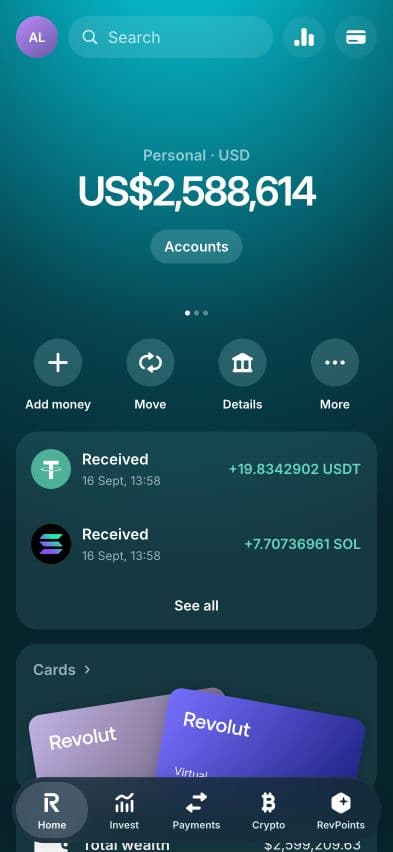
Start with one personal account, show its currency and amount, then switch to the next account as a separate shot. In RPWallet's Revolut interface, fiat account values and crypto quantities are distinct. Changing which account you view is not the same action as exchanging its balance.
Before you start
- Access to the Revolut-style app from your RPWallet dashboard.
- A configured demo account for each currency in your scene.
- A short shot list with currency codes, starting amounts and the intended ending screen.
Rehearse the account sequence
Keep the account, amount and unit visible in each shot.
Choose the scene's starting account
HomeOpen Home and note the selected Personal account and its currency. Write the starting amount in your shot list with a code such as USD, EUR or GBP. Avoid a bare currency symbol in your production notes when more than one dollar currency could be involved.
Inspect the other accounts
AccountsOpen Accounts and review the personal accounts your scene will visit. Confirm that each expected account is visible before recording. If the setup needs changes, use the Revolut setup guide in your signed-in dashboard, then return to the viewer-facing account screens.
Record each account switch as its own action
Select the next account and pause long enough for its label and amount to be readable. Narrate this as switching accounts. Do not imply an exchange took place simply because the next screen shows a different currency or number.
Keep crypto shots separate
CryptoIf your sequence includes Crypto, introduce that screen as a portfolio of token quantities and market-valued positions. Do not add token units directly to a cash balance. For a cash-only scene, end on the relevant Personal account instead.
Check a test export
Watch a short recording at the final crop and text size. Confirm that every amount still has its currency context, and that an edit does not make an account switch look like an incoming payment. Include a clear fictional-demo label in the finished clip.
If something goes wrong
- A currency account is missing from the list.
- Check the account's configured balance and visibility in your wallet setup. A base-currency preference does not, by itself, create every possible personal account.
- Changing a conversion rate did not set the account balance.
- A conversion rate and a held amount have different purposes. Review the personal-account balance itself using the signed-in setup instructions; do not use an exchange-rate field as a balance field.
- The next take opens on the wrong account.
- Return to Accounts and select the intended starting account before recording. Keep the same order in your shot list rather than relying on the last screen you happened to leave open.
Prepare a multi-currency wallet demo FAQ
Does switching accounts exchange money?
No. Choosing another account changes the screen you are viewing. It does not, by itself, exchange a balance or perform a real bank transfer.
Can I use a demo account as proof of funds?
No. The displayed account is a fictional production setup. It is not a bank account, statement or evidence of a real payment.
Where are the detailed balance setup steps?
Sign in to the RPWallet dashboard and open the Revolut setup guide. The public walkthrough covers planning and recording; the dashboard guide explains the app's configurator.
Next guides
Plan a demo store dashboard walkthrough
Prepare a fictional store recording with consistent sales, orders, sessions and date ranges. Review the dashboard and order detail before filming.
Choose a LARP wallet for your scene
Choose between Phantom, Trust Wallet, Exodus and Ledger Live-style LARP wallets by planning your scene, assets and on-screen interactions.
Plan a LARP wallet video
Plan a fictional LARP wallet video with a simple shot list, consistent token quantities, a rehearsal and clear simulation labeling.
Every RPWallet guide
Setup, balances and tokens, and content — the full index.
Keep reading
Payment app scenes
Explore a different style of fictional money-app screen.
Understand the portfolio total
Separate token quantities from their display value.
Record your walkthrough
Prepare the phone and review the finished capture.
Revolut setup for members
Sign in for the detailed configurator walkthrough.
Prepare your next account walkthrough.
No download, no seed phrase, no real funds. Installs to your home screen on iOS and Android in about two minutes.